如何查看 Windows 10 PC 蓝牙适配器版本号
Windows操作系统作为优秀的操作系统,由开发操作系统的微软公司控制接口和设计,公开标准,因此,有大量商业公司在该操作系统上开发商业软件。
如果需要知道或查看当前 Windows 10 PC 所使用的蓝牙适配器版本,可以去品牌机的官网上查询,或者直接查看系统信息。
辨别Windows 10 PC中的蓝牙适配器版本号
1使用?Windows + R?快捷键打开「运行」——执行?devmgmt.msc?打开「设备管理器」
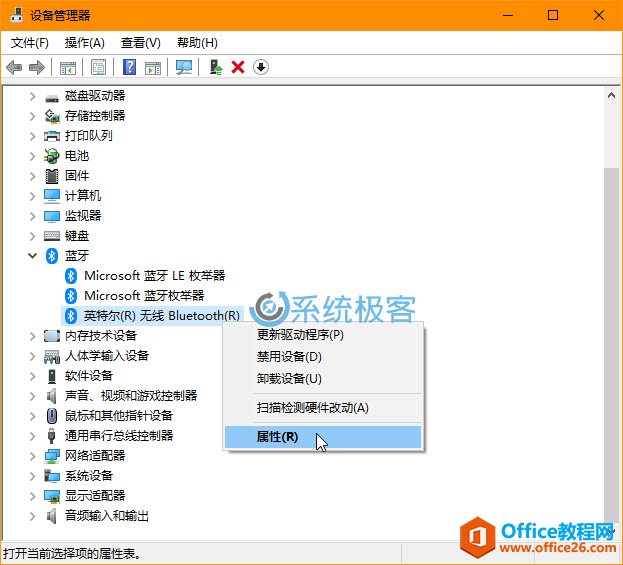
2展开「蓝牙」——右击要查看的蓝牙设备名称——选择「属性」
3点击「高级」选项卡——查看「固件版本」中显示的?LMP?版本号。
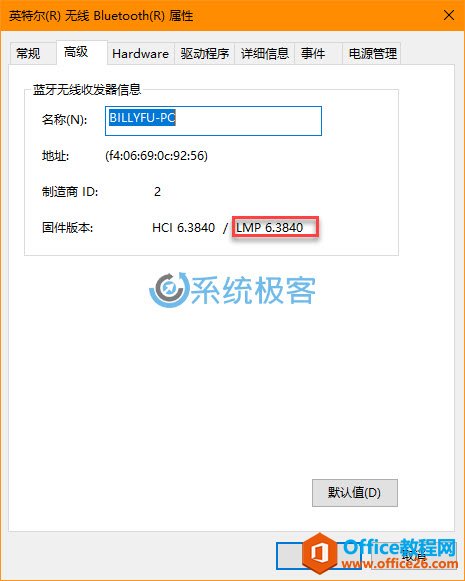
将查看到的 LMP 大版本号与下表对应,便可得知当前 Windows 10 PC 所使用蓝牙适配器版本号。
| LMP | 蓝牙版本号 |
|---|---|
| 0 | Bluetooth 1.0b |
| 1 | Bluetooth 1.1 |
| 2 | Bluetooth 1.2 |
| 3 | Bluetooth 2.0 + EDR |
| 4 | Bluetooth 2.1 + EDR |
| 5 | Bluetooth 3.0 + HS |
| 6 | Bluetooth 4.0 |
| 7 | Bluetooth 4.1 |
| 8 | Bluetooth 4.2 |
| 9 | Bluetooth 5 |
Windows操作系统对硬件支持良好。
……